SANM 560 Blog
Collaborative Project with Harbor Pictures × Electric Theatre Collective × Calling All Talent
Winter 2026 | Lighter
The project focuses on producing a commercial-quality VFX advertisement with high-end visual effects shots to showcase premium product visuals. I was responsible for look development and lighting design, ensuring visual realism and strong cinematic impact through research-driven real-world references. The production progressed through weekly industry mentor reviews. AI-assisted tools such as Midjourney, Meshy AI, and MyGIF were integrated into the workflow to accelerate iteration, enhance visual quality, and improve overall production efficiency.
Week 1
TO DO list:
-
Brainstorm story ideas for the commercial
-
Develop Storyboard
-
Develop pre-visualization video
During the weekdays, we brainstormed ideas for the pitch and talked about what products we want to advertise. I started a Figma page to record our ideas and keep organization. https://www.figma.com/board/aWqXPpAZX2nqJTE5R5rbzt/Ideation-and-Brainstorm?node-id=0-1&p=f&t=xQQxa8fc0WiDL4fU-0
I also came up with one script, which is not the final selection of ours, but contributes some ideas.
Introduction
Flower Valley is an Unreal Engine set dressing project that brings to life a dreamlike, romantic landscape. At its heart stands a grand white Gothic castle, symmetrically designed around a giant magic tree at the center. The valley is bathed in soft pink hues, filled with cherry blossom trees that enhance the ethereal atmosphere.
For this project, I utilized and modified pre-existing assets, making adjustments such as removing object parts, merging elements, and altering textures to better fit the scene. Additionally, I implemented interactive elements, allowing players to engage with the castle gate and elevator. Through careful composition and lighting, the environment evokes a sense of wonder and serenity, immersing viewers in a beautifully crafted fantasy world.

On the weekends, we made the PowerPoint for the presentation. I was responsible for the moodboard and lighting references plan.

Week 2
TO DO list:
-
Develop a new storyboard according to the mentors' advice
-
Basic lighting plan for the room and pre-viz
According to the mentors' comments and suggestions, we discussed and created a new storyboard that emphasizes the visual experiences provided by the VR headset. We removed the processing card part and the Meta Human head, and added shots to show the difference in the room before and after wearing the headset.

Storyboard
This week, I did some basic lighting tests to explore the overall mood of the project. I set up a dark interior room with subtle moonlight coming through the window, focusing on how low light and shadows behave in the space.
I also tested the lighting for the plants and emissive materials in shot 1, mainly to see how they contribute to the scene without overpowering the environment.
For shot 5, I focused on the lighting change as the door opens and closes, testing how the moving light affects the interior and helps guide the viewer’s attention.


Shot 1
Shot 1
Week 3
According to the mentors' comments and suggestions, we revised our storyboard again. This time we changed the order of the shots to make the story more appealing and reasonable.
.png)
Storyboard
TO DO List
-
Emissive materials test
-
Environment setdressing with simulations in
-
Lighting test with tectures applied
Emissive Test
I used maskbyfeature node to generate masks on the plants and imported the attribute when using SOPimport, so that the masks can be used in material as alpha of emission. This allows me to quickly generate emissive and test lighting while materials are not ready.


Masks


Emission
Asset Development
I also created daisy flowers which serve as background to enrich the scene.


Lighting
Since the assets and materials are not optimized enough to be imported into the scene, the lighting is still at a rough stage. I set up basic three-point lighting for the main focus of the first and second shots, and some ambient light for the general mood establishment.


Week 4
TO DO list:
-
Lighting lockdown for shots 4 and 5
-
Lighting set up for live action
-
Lighting with emission off and with textures
I had a lighting lockdown for shots 4 & 5 in order to have a reference for the live action shooting.


Shot 4
Lit Room
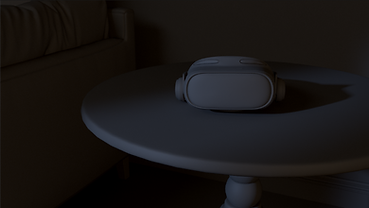

Dull Room


Shot 5
I tested two versions of lighting for the flowers in shot 1. The first lighting set up is featured by a point light at the back of the flower as the main light and a high subsurface value to create a glowing effect. The second setup uses a yellow-tint point light as the main light to give a sense of glow from the pistils.


V01 f0r old flowers with and without textures
V02 f0r old flowers with and without textures
A third lighting setup is created for the new version of the flowers provided by the FX team.

V03 f0r new flowers without textures


Details of textures and lighting


Live action shoot with green screen
Week 5
TO DO list:
-
Adjust lighting for new textures and plants FX
-
Create a preliminary lighting for compositing
-
Detail lighting for sub-hero shot: shot 1
-
Detail lighting for hero shot: shot 3
Lighting versions for shot 1 with different details. This lighing set up has one point light in the front to give more dynamic colors for the flower. Another point light is at the back of the flower to show the subsurface.


A preliminary lighting is created for compositing to enable ID render. The light is created with a single bright area light from the ceiling.


Lighting for all 4 shots.
Week 6
TO DO list:
-
Adjust lighting for new textures and plants FX
-
Adjust the preliminary lighting for compositing
-
Detail lighting for sub-hero shot: shot 1
A moonlight interior lighting is set up for the scene to ensure realism of the living room and the plants.


Moonlight flowers
Magical light flowers

Moonlight room without any magical plants


Different lighting versions with shot 1
Week 7
TO DO list:
-
Refine lighting: darken the scene to address the focal point
-
Set up AOV passes for the moonlight and magic light
-
Set up renderlayers for shot3
-
Refine the models of the interior scene
New models for the chair is updated to the scene to ensure the style of the livingroom. The edges of the coffee table and the round table are refined for detail renders.

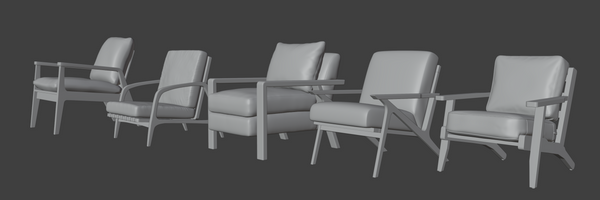
New lighting for each shot is updated for the render. The emission map is taken from the flowers. I used pointlights instead to make the light and shadows more prominent. The lighting is subtlely brighter than we expected for the final look in order to maintain the details on the flower petals and give more room for compositing. A spotlight is set up to highlight the headset and showcase our product. Below are the raw renders for each shot.


Renders started from Friday. During the rendering, we trobleshooted and fixed many problems:
1. The textures are reduced from 4k to 1k in order to prevent MAX OUT in the render farm.
2. The ferns are re-exported to reduce their size.
3. The texture paths are cleaned to ensure rendering.
These are the three main reasons causing the renders break.
Week 8
TO DO list:
-
Adjust the lighting for each shot to ensure contrast on plants, especially grass
-
Noise tests to reduce the noise in the render
-
Set up AOV passes for each shot
Lighting comparisons between week 7 and week 8:


I did a couple of tests with different primary samples, min, and max secondary samples, and noise level to test noises and render time:


Noise level: 0.01 Noise LEvel: 0.001 (same samples)

primary sample of 100
min secondary of 1
max secondary of 8

primary sample of 100
min secondary of 1
max secondary of 32

primary sample of 100
min secondary of 4
max secondary of 32

primary sample of 256
min secondary of 4
max secondary of 32
From the noise tests, I found out that increasing min and max secondary samples does not help much, increasing primary sample helps a little, but not significant changes. The most useful parameter is checking Enable Indirect Guiding and reducing noise level, which allows more calculation in darker areas.
The render below is using a primary sample of 256, min secondary of 4, max secondary of 16, no indirect guiding, and reducing noise level. (render time 68 min, 1080HD resolution) It still has a lot of noises.

Week 9
TO DO list:
-
Optimize render time
-
Set up render layers for light interaction
-
Set up AOV passes for each shot
-
Reduce noises and fireflies
Through trouble shooting, we found that the fireflies were coming from the specular on the vine material. Since we are using different materials for the vine's light interaction with the environment and the actual vine, I can lower the specular value of the emission without affecting the looking of the vine. The fireflies were finally completely removed.


Week 10
TO DO list:
-
Team breakdown
-
Personal breakdown
-
Technical poster
-
Render lighting images for breakdown
